
✅ Current for tax year 2026
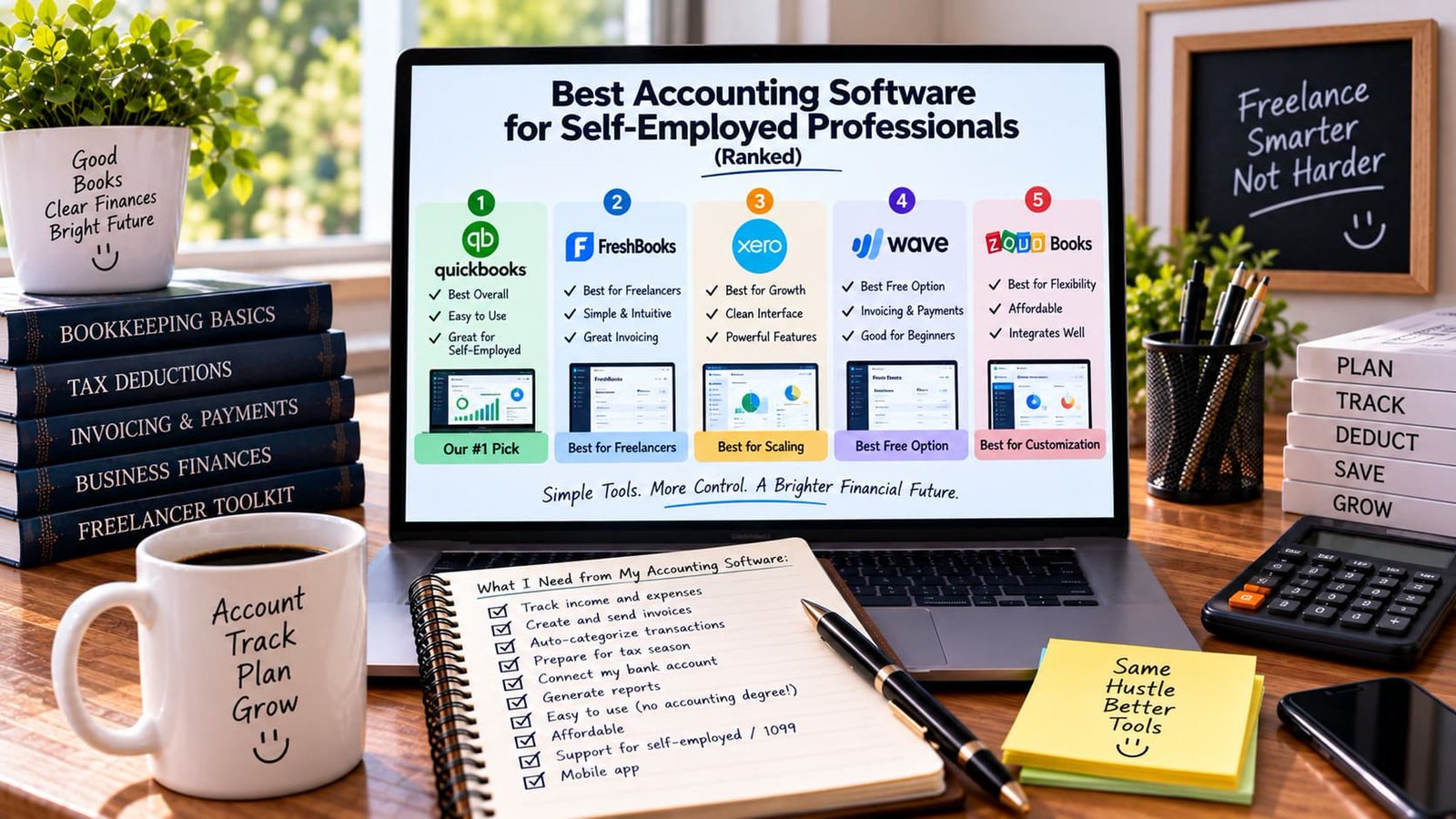
Quick answer: QuickBooks is the strongest all-around pick for most self-employed filers, FreshBooks edges it out specifically for freelancers who invoice frequently, Xero is the better long-term choice if you expect to grow, Wave is the best free option, and Zoho Books is worth a look if flexibility and affordability matter most to you. Below is why, in that order.
What to actually judge software against
Before comparing brand names, judge any accounting tool against what a self-employed filer genuinely needs: automatic Schedule C-style expense categorization, mileage tracking, a running estimate of quarterly taxes owed, invoice creation without a second app, bank account connections, and reports you can hand to a preparer without translation. Pricing and specific features change fairly often across all of these products, so treat the notes below as a starting framework and check current plans directly before committing.
1. QuickBooks — best overall
QuickBooks (Self-Employed or Solopreneur tier) remains the most complete option for most people in this audience: strong mileage tracking, automatic transaction categorization aligned closely with Schedule C line items, and a quarterly tax estimate built directly into the dashboard. It’s also the tool most accountants and tax preparers are already familiar with, which matters if you ever hand off your books to a professional. The tradeoff is cost — it’s rarely the cheapest option on this list.
2. FreshBooks — best for freelancers
FreshBooks leans hardest into the freelancer-specific workflow: simple, intuitive interface, and genuinely excellent invoicing — recurring invoices, automatic payment reminders, and a client-facing polish that makes a small operation look established. If most of your accounting need is “get invoices out and get paid,” FreshBooks often beats QuickBooks on ease of use, even if it’s slightly less deep on the tax-categorization side.
3. Xero — best for growth
Xero’s clean interface and genuinely powerful underlying features make it the strongest choice if you expect your one-person operation to grow — adding contractors, more complex inventory, or multiple income streams. It has a steeper learning curve than FreshBooks or Wave, which is exactly why it’s ranked third here for a typical solo freelancer rather than first, even though it can out-scale the others.
4. Wave — best free option
Wave remains the most fully-featured free accounting tool most freelancers will find: invoicing, payment processing, and basic bookkeeping at no monthly cost (Wave makes money on payment processing fees instead). It’s a genuinely solid starting point for a solo operator with straightforward income, with the tradeoff being fewer automation features and less robust mileage/receipt-scanning tools than the paid options above it.
5. Zoho Books — best for flexibility
Zoho Books is the most affordable of the paid options here and integrates tightly with the rest of the Zoho ecosystem (including Zoho Invoice — see The Best Invoicing Tools for the Self-Employed for more on that side specifically). It’s a strong pick if you want a lower-cost paid tool with more customization flexibility than Wave offers, without needing everything QuickBooks or Xero bring to the table.
| Pick | Best for | Standout strength |
|---|---|---|
| 1. QuickBooks | Best overall | Deepest Schedule C-aligned categorization |
| 2. FreshBooks | Freelancers | Best invoicing experience |
| 3. Xero | Growth | Scales past a one-person operation |
| 4. Wave | Free option | Full bookkeeping at no monthly cost |
| 5. Zoho Books | Flexibility | Affordable, integrates well |
What to check before you commit
- Track income and expenses automatically
- Create and send invoices
- Auto-categorize transactions toward Schedule C lines
- Prepare for tax season with exportable reports
- Connect your bank account securely
- Generate reports without needing an accounting degree
- Confirm current pricing and self-employed/1099 support directly
- Check for a mobile app if you need to log expenses on the go
What the software can’t replace
No accounting app automatically knows every deduction you’re entitled to — see the complete deductions list and cross-check your software’s categorization against it periodically. And however good a built-in estimate feature is, it’s worth double-checking against the 1099 & Quarterly Tax Calculator, especially in a year where your income shifted meaningfully from the last.
Switching tools without losing your history
If you’re moving from one accounting tool to another mid-year, most platforms support exporting your transaction history as a CSV or similar format that the new tool can import — this preserves your categorized history rather than starting from a blank slate. It’s worth doing this deliberately at a clean break point (like the start of a new quarter) rather than mid-month, to avoid split records that are harder to reconcile later.
How to actually evaluate a tool before committing
- Use the free trial with your real transactions, not sample data, before paying
- Confirm it categorizes your specific type of income and expenses reasonably well out of the box
- Check whether mobile receipt scanning and mileage tracking work the way you’d actually use them
- Ask (or search) whether it exports cleanly to whatever your tax preparer uses, if you work with one
- Compare the real cost after any promotional pricing period ends

Why the “right” tool changes as your business grows
A tool that’s perfect for a solo freelancer with straightforward 1099 income can start to feel limiting once you’re managing subcontractors, multiple revenue streams, or inventory. There’s nothing wrong with switching tools as your needs evolve — treat the choice as right for where you are now, not a permanent decision, and revisit it periodically rather than sticking with something that no longer fits simply out of inertia.
What to do if you’ve been managing books manually until now
If you’ve been tracking income and expenses in a basic spreadsheet or, worse, not tracking them systematically at all, moving to dedicated accounting software mid-year is still worthwhile even though it means a slightly messier transition than starting fresh in January. Most tools allow you to import historical bank transactions going back several months, letting you reconstruct a reasonably accurate picture of the year so far rather than starting the software with a blank slate that ignores everything that happened before you adopted it.
Working with an accountant or preparer alongside your software
Accounting software handles day-to-day categorization and reporting, but it doesn’t replace professional tax advice, particularly once your situation involves retirement contributions, multiple income streams, or entity structure decisions. Most of the tools discussed above support giving read-only or accountant-level access to a tax professional directly, which tends to produce a smoother, more accurate tax season than exporting reports manually and emailing them each year.
How to migrate cleanly if you decide to switch later
If you eventually outgrow your first accounting tool choice, most platforms support exporting a clean transaction history and chart of accounts that a new platform can import, minimizing the disruption of a switch. The best time to make this kind of transition is at a natural boundary — the start of a new tax year or quarter — rather than mid-month, which avoids split records that complicate reconciliation and reporting for the transition period itself.
Before switching, it’s worth exporting at least a year of historical data from your old tool regardless of whether the new tool needs it immediately, simply as a backup and reference in case you need to look something up from a prior period after your subscription to the old tool has ended.
Bottom line
QuickBooks is the safest default pick for most self-employed filers, but the “best” one genuinely depends on your workflow — pick based on whether invoicing, growth, cost, or flexibility matters most to you specifically. Whatever you choose, make sure it exports cleanly to whatever you or your preparer use to actually file your Schedule C.
Related guides
- MassHealth Guide: How to Provide Proof of Income as an Independent Contractor
- Independent Contractor Invoice Template (Free Word, Google Docs, PDF)
- What Counts Toward Your AGI When You’re Self-Employed
- Current Mortgage Rates for the Self-Employed in Essex County
- Mortgage Loans for Self-Employed: Requirements, Documents, and Bank Statement Options
- 5 Late Payment Email Templates for Freelancers (That Get You Paid)
- Freelance Web Developer and Web Designer Tax Deductions: Software, Hosting, Coworking, and Gear
- Freelance Graphic Designer Tax Deductions: Software, Hardware, and Home Studio Costs
- Freelance Photographer Tax Write-Offs: Gear, Depreciation, Travel, and Studio Costs
- Free Expense Tracker Template for Schedule C (Excel and Google Sheets)