
✅ Current for tax year 2026
Quick answer: A computer, laptop or camera used in your business is a capital purchase, but you can usually deduct it in the year you buy it. There are three routes. (1) The de minimis safe harbor lets you expense items that cost $2,500 or less per item or invoice if you elect it each year. (2) Section 179 lets you expense qualifying equipment up to $2,560,000 for 2026, but only if you use it more than 50% for business, and only the business-use share counts. (3) The special depreciation allowance (bonus depreciation) is back at 100% for qualified property acquired and placed in service after January 19, 2025, or you can depreciate normally over several years. Equipment you use partly for personal reasons is deductible only for the business percentage.
In this guide
- Is it an expense or a capital purchase?
- Option 1: the de minimis safe harbor
- Option 2: Section 179
- Option 3: depreciation, including the 100% special allowance
- Which option should you choose?
- Worked example 1: a laptop under the de minimis limit
- Worked example 2: a laptop over the limit, partly personal
- Worked example 3: the business-use percentage from the IRS
- Which route applies to your purchase?
- Where it goes on your return
- Records and special cases
- Your questions answered
- Final thoughts
- Sources
Is it an expense or a capital purchase?
Everyday supplies, such as paper, a mouse or software subscriptions, are expensed. Equipment that lasts more than a year, such as a laptop or camera body, is a business asset that is normally depreciated, meaning the cost is recovered over its useful life. The rules below let you recover the cost faster, often in one year. In every case, only the business part of the cost is deductible, and you keep records of the purchase and your business use; see do you need receipts.
Option 1: the de minimis safe harbor
Under the IRS tangible property regulations, you can elect to treat small purchases as current expenses. For a taxpayer without an applicable financial statement, the limit is $2,500 per item or per invoice. The election is made each year by attaching a statement to your timely filed return, and it applies to all qualifying purchases that year. For many freelancers it is the simplest way to deduct a $1,800 laptop or a $900 lens. Check the IRS tangible property page and Publication 334 for the conditions, such as consistent treatment on your books.
Option 2: Section 179
Section 179 lets you treat the cost of qualifying property as an expense in the year you place it in service. IRS Revenue Procedure 2025-32 sets the 2026 numbers: the maximum Section 179 expense is $2,560,000, and it is reduced if you put more than $4,090,000 of Section 179 property in service. The limit for sport utility vehicles is $32,000. Publication 946 explains the main conditions:
- Business use over 50%. When you use property for both business and personal purposes, you can elect Section 179 only if you use it more than 50% for business in the year you place it in service. You then multiply the cost by the business-use percentage to find the cost you can expense.
- Acquired by purchase. Property acquired by gift or inheritance does not qualify.
- Business income limit. The deduction cannot exceed the taxable income from your business; any excess carries over.
- Election. You make the election on Form 4562.
If you stop using the property more than 50% for business in later years, part of the deduction may have to be recaptured as income, so use care when claiming Section 179 on property that is easy to use personally.
Option 3: depreciation, including the 100% special allowance
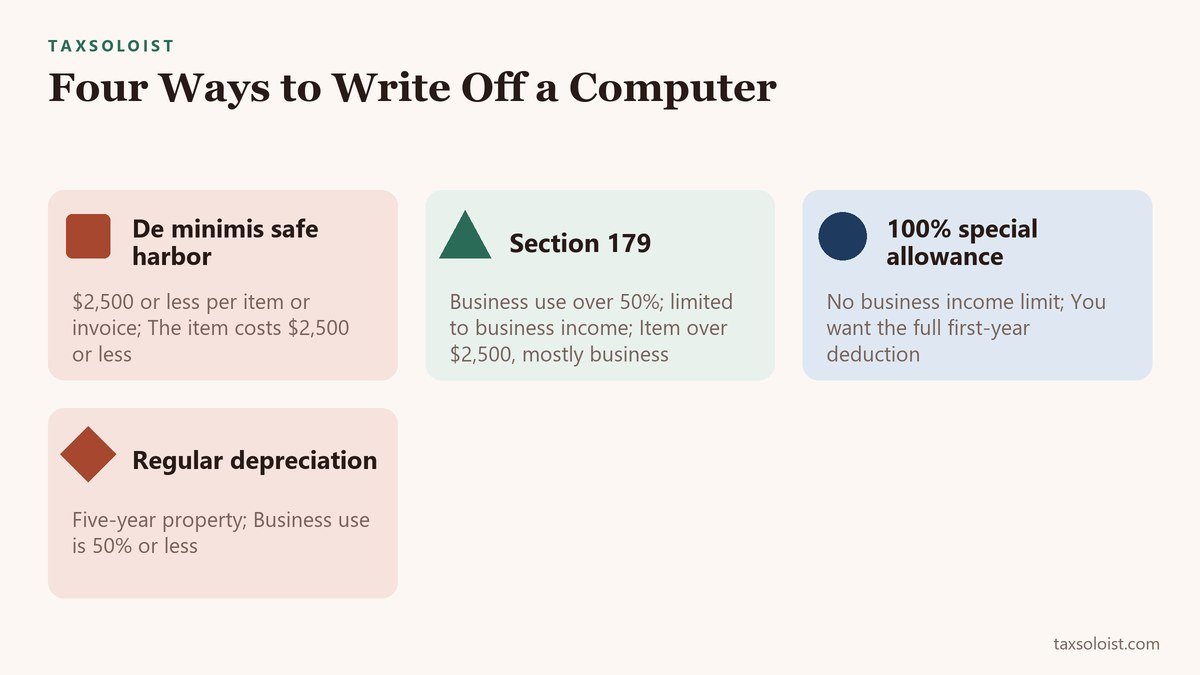
If you do not expense the equipment, you depreciate it over its recovery period (computers are generally five-year property under the MACRS system; see Publication 946 for the table that fits your asset). In addition, Publication 946 explains that the 2025 tax law reinstated the 100% special depreciation allowance for qualified property acquired and placed in service after January 19, 2025, so many purchases can be deducted in full in the first year even if you do not use Section 179. You can elect a lower allowance for a class of property if you prefer. Depreciation is figured on Form 4562. Because the 100% allowance applies to qualified property regardless of cost, it can be useful above the $2,500 safe harbor, although it also applies only to the business-use share.
| Route | Key rule (2026) | Usually best when |
|---|---|---|
| De minimis safe harbor | $2,500 or less per item or invoice (no applicable financial statement); election made each year | The item costs $2,500 or less |
| Section 179 | Maximum $2,560,000; business use must be over 50%; limited to business income; Form 4562 | Item over $2,500 and mostly business use |
| 100% special depreciation allowance | Qualified property acquired after January 19, 2025, unless you elect out; no business income limit | You want the full first-year deduction without the 179 income limit |
| Regular depreciation | Computers are generally five-year MACRS property | Business use is 50% or less, or you want to spread deductions across years |
Which option should you choose?
- Item or invoice of $2,500 or less: the de minimis safe harbor is usually simplest and requires no Form 4562 for that item.
- Item over $2,500, mostly business: Section 179 or the 100% special allowance gives the same first-year deduction, but Section 179 has the income limit and the recapture rule, while the special allowance does not have an income limit.
- Business use of 50% or less: Section 179 is not available; consider regular depreciation of the business part.
- You want to spread deductions across several years, for example because your income will be higher later: use regular depreciation and elect out of the special allowance.
Because the choice changes your taxable income in the current year, compare it with your expected bracket. The tax deduction calculator and the marginal rate guide help you estimate the savings.
Worked example 1: a laptop under the de minimis limit
Mia buys a $2,400 laptop for her writing business and uses it 100% for business. She makes the de minimis safe harbor election.
- Deduction in 2026: $2,400, in the year of purchase.
- At a combined marginal rate of about 34.6% (the example in our marginal rate guide), the tax saving is about $830.
Worked example 2: a laptop over the limit, partly personal
Noah buys a $3,200 laptop and uses it 70% for business and 30% for personal reasons.
- Business-use share: 70% times $3,200 is $2,240.
- Because business use is above 50%, he can expense the $2,240 under Section 179 (or use the special allowance), as long as his business income is at least that high.
- The $960 personal portion is not deductible.
The de minimis safe harbor does not apply here because the $3,200 invoice is above $2,500.

Worked example 3: the business-use percentage from the IRS
Publication 946 uses this example: an item of Section 179 property cost $11,000, was used 80% for business and 20% for personal purposes. The business part of the cost is $8,800 (80% times $11,000). A photographer who buys an $11,000 camera and lens kit and uses it 80% for paid shoots would have $8,800 of business cost to expense, and the same deduction would apply to a video editor’s workstation. If the business use fell to 40% in a later year, Section 179 recapture rules could apply.
| Mia | Noah | Publication 946 example | |
|---|---|---|---|
| Purchase | $2,400 laptop, 100% business | $3,200 laptop, 70% business | $11,000 item, 80% business |
| Route | De minimis safe harbor | Section 179 or special allowance | Section 179 |
| First-year deduction | $2,400 (saves about $830) | $2,240 ($960 personal part not deductible) | $8,800 |
Which route applies to your purchase?
Enter the cost, your business-use percentage and your combined marginal rate to see which routes are open and the first-year deduction and tax saving for the business share. It is a simplified estimate: it does not check the business income limit.
This calculator needs JavaScript.
Where it goes on your return
Section 179 and depreciation are reported on Form 4562, and the result goes on Schedule C (line 13). De minimis items go on Schedule C as supplies or other expenses; the election statement is attached to the return. See Schedule C line by line.
Records and special cases
Keep the invoice, the date you started using the equipment, a note of your business-use percentage and a copy of Form 4562 or the de minimis election statement. For a camera, lens or phone that you also use personally, keep a simple log or a reasonable allocation, such as the share of time or shoots that were for clients. Accessories bought with the item, such as a case, bag or memory cards, are generally deductible with it or as supplies. Software that you license by subscription is normally an ordinary expense, not a capital purchase. When you replace a computer, the old one may be sold or scrapped: report any sale proceeds, and if you took Section 179 or bonus depreciation, expect that part of the sale price can be taxable. Equipment bought for a home office is covered by the same rules; see the home office guide for the space itself.
Your questions answered
Can I deduct a computer I also use for personal things?
Yes, for the business share. Use a log or reasonable estimate, and keep it consistent.
Do I need an LLC?
No. A sole proprietor can claim these deductions on Schedule C.
What about a phone, tablet or software?
The same rules apply to equipment. Software subscriptions are usually deducted as ordinary expenses.
What happens when I sell or stop using the equipment?
You may have to report gain or recapture depreciation. Keep the purchase records until the limitations period ends for the year you dispose of it.
Is a vehicle treated the same way?
No. See our guide on the Section 179 vehicle deduction.
Final thoughts
For most freelancers, a computer, laptop or camera can be deducted in the year of purchase, through the $2,500 de minimis safe harbor, Section 179 (limit $2,560,000 in 2026 with the over-50% business-use test) or the 100% special depreciation allowance. Only the business share counts, so keep a note of how you use the equipment and keep the receipts. These are general rules; confirm your situation with the IRS publications or a tax professional.
Related guides
- Self-Employed Tax Deductions: The Complete List for 2026
- Schedule C Line by Line
- Tax Deduction Calculator
- Mileage Deduction Calculator
- Self-Employment Tax Calculator
- How to Calculate Quarterly Estimated Taxes for the Self-Employed
- Effective Tax Rate vs. Marginal Rate: How to Calculate Yours
- Best Accounting Software for the Self-Employed
- Tax Deductions Freelancers Often Miss
- Home Office Deduction for Freelancers
- Do You Need Receipts for Tax Write-Offs?
- Section 179 Vehicle Deduction
- Freelance Photographer Tax Write-Offs
- Freelance Graphic Designer Tax Deductions
- Freelance Web Developer Tax Deductions
- Content Creator Tax Write-Offs: YouTube, Influencer, and Creator Expenses
- Freelance Writer Tax Deductions: The Complete Write-Off List for 1099 Writers
- Hair Stylist Tax Write-Offs: Booth Rent vs. Commission, Supplies, and Licenses
- Freelance Artist Tax Deductions: Studio, Supplies, and the Hobby-Loss Rule
- Freelance Makeup Artist Tax Deductions: Kit, Mileage, Booth Rental, and Insurance